Topaz
A pipeline for particle detection in cryo-electron microscopy images using convolutional neural networks trained from positive and unlabeled examples. Topaz also includes methods for micrograph and tomogram denoising using deep denoising models.
Official Topaz site : http://cb.csail.mit.edu/cb/topaz/
Topaz Executables
Basically, topaz uses NVIDIA GPUs with CUDA support for GPU acceleration in order to provide the features like automatic particle picking, denoising, etc. Here, we have installed Topaz into seperate conda environments, where each is built upon CUDA 9.x and CUDA 11.x. You can find out each version of topaz executables with the following commands:
$> module avail

-------- /tem/el7/Modules/apps --------
apps/cistem/1.0.0
apps/relion/cpu/4.0.0
apps/relion/cpu/4.0.1
apps/relion/cpu/5.0.0
apps/relion/gpu/4.0.0
apps/relion/gpu/4.0.1
apps/relion/gpu/5.0.0

---- /tem/el7/Modules/acceleration ----
cuda/9.2  cuda/11.2

-------- /tem/el7/Modules/mpi ---------
mpi/gcc/4.8.5/openmpi/4.0.3
mpi/gcc/8.3.1/mpich/3.4.3
mpi/gcc/8.3.1/openmpi/4.0.3
mpi/gcc/openmpi/4.0.3

----- /tem/el7/Modules/virtualenv -----
conda/2020.11  topaz/cuda-9.2/0.2.4
pyem/0.5       topaz/cuda-11.0/0.2.4

------- /tem/el7/Modules/tools --------
tools/aspera-cli/3.9.6
tools/ctffind/4.1.14
tools/gctf/1.18_b2
tools/motioncor2/1.3.1
tools/resmap/1.1.4
tools/summovie/1.0.2
tools/unblur/1.0.2

----- /tem/el7/Modules/experiment -----
PyRosetta/4
python/3.7
rosetta/mpich-3.4.3/3.13
rosetta/openmpi-4.0.3/3.13
Topaz binary executable with CUDA 9.2
$> module load topaz/cuda-9.2/0.2.4
Loading topaz/cuda-9.2/0.2.4
  Loading requirement: conda/2020.11

(topaz-v0.2.4-cuda9.2) $>
(topaz-v0.2.4-cuda9.2) $> which topaz
/tem/el7/conda3-2020.11/envs/topaz-v0.2.4-cuda9.2/bin/topaz
With above command, you can find that the path of topaz executable with CUDA 9.x support is /tem/el7/conda3-2020.11/envs/topaz-v0.2.4-cuda9.2/bin/topaz.
Topaz binary executable with CUDA 11.2
$> module load topaz/cuda-11.0/0.2.4
Loading topaz/cuda-11.0/0.2.4
  Loading requirement: conda/2020.11

(topaz-v0.2.4-cuda11.0) $>
(topaz-v0.2.4-cuda11.0) $> which topaz
/tem/el7/conda3-2020.11/envs/topaz-v0.2.4-cuda11.0/bin/topaz
With above command, you can find that the path of topaz executable with CUDA 11.x support is /tem/el7/conda3-2020.11/envs/topaz-v0.2.4-cuda11.0/bin/topaz.
Using Topaz in CryoSPARC
If your CryoSPARC instance’s version is v3.0.1, you should use the topaz executable /tem/el7/conda3-2020.11/envs/topaz-v0.2.4-cuda9.2/bin/topaz because the CryoSPARC is built upon CUDA 9.2 support. Otherwise if you use CryoSPARC v3.2.0+, the topaz executable is /tem/el7/conda3-2020.11/envs/topaz-v0.2.4-cuda11.0/bin/topaz.
Please refer to https://guide.cryosparc.com/processing-data/all-job-types-in-cryosparc/deep-picking/topaz for executing topaz jobs in CryoSPARC.
Using Topaz in Relion (v3.1.0 above)
To run topaz jobs within relion data analysis tool, you SHOULD USE Relion v3.1 above and Topaz v0.2.4 above. For your conveneince, we have cloned all the relion_run_topaz packages to GSDC TEM farm.
Here is the location of relion_run_topaz packages:
/tem/el7/topaz/relion_run_topaz/run_topaz_denoise.py
/tem/el7/topaz/relion_run_topaz/run_topaz_pick.py
/tem/el7/topaz/relion_run_topaz/run_topaz_train.py
/tem/el7/topaz/relion_run_topaz/run_topaz_train_denoise.py
$> pwd
/tem/el7/topaz/relion_run_topaz
[tem@tem-cs-el7 relion_run_topaz]$ tree .
.
├── LICENSE
├── README.md
├── run_topaz_denoise.py
├── run_topaz_pick.py
├── run_topaz_train.py
└── run_topaz_train_denoise.py

0 directories, 6 files
Since Relion v3.1+ has built using CUDA 9.2 support, we have modified topaz_path with this executable /tem/el7/conda3-2020.11/envs/topaz-v0.2.4-cuda9.2/bin/topaz in all the above python scripts.
For an external job type in relion GUI, after providing python executable path, inputs and optional parameters, you can use one of the following job submission templates.
/tem/el7/qsub-relion-3.1.0-topaz.bash
/tem/el7/qsub-relion-4.0.0-topaz.bash
/tem/el7/qsub-relion-4.0.1-topaz.bash
/tem/el7/qsub-relion-5.0.0-topaz.bash
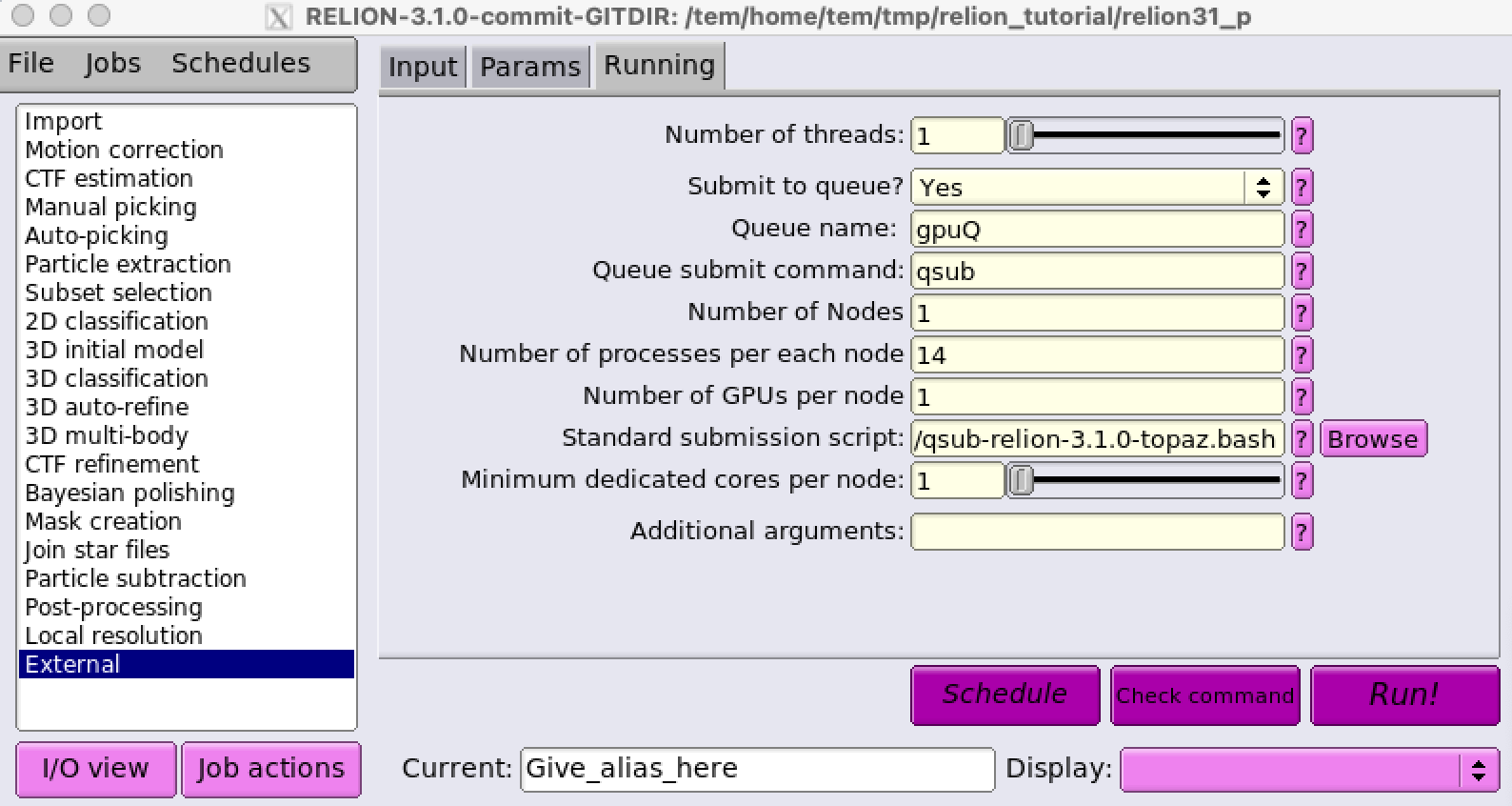
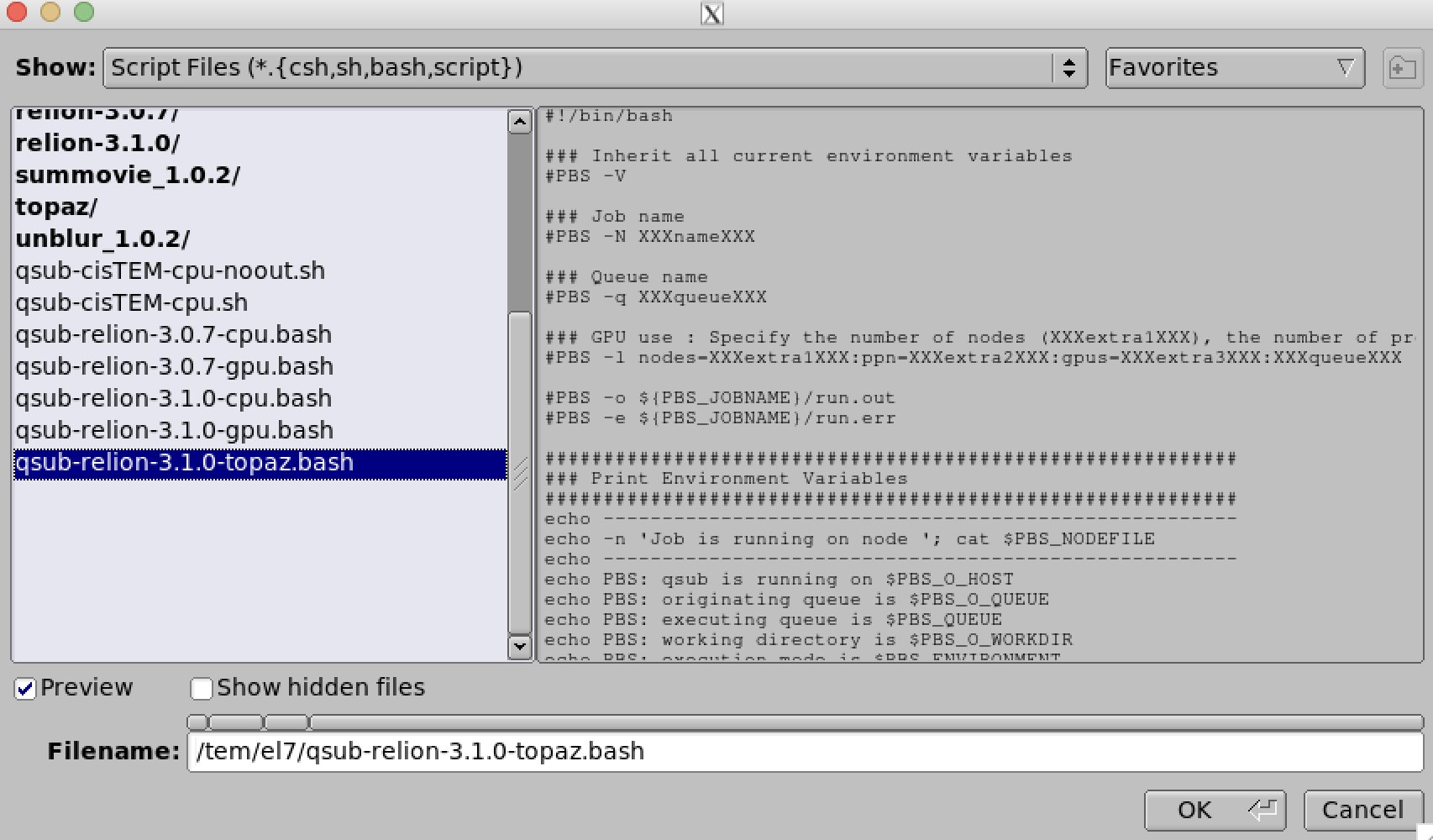
Note that both number of nodes and number of GPUs are set to 1 due to the lack of parallelism across multiple servers and GPUs in Topaz application. For more details on running topaz jobs in relion (using external job type), please refer to https://github.com/tbepler/topaz/tree/master/relion_run_topaz.