GSDC Computing Cluster for TEM Users and Operators
1. Service overview
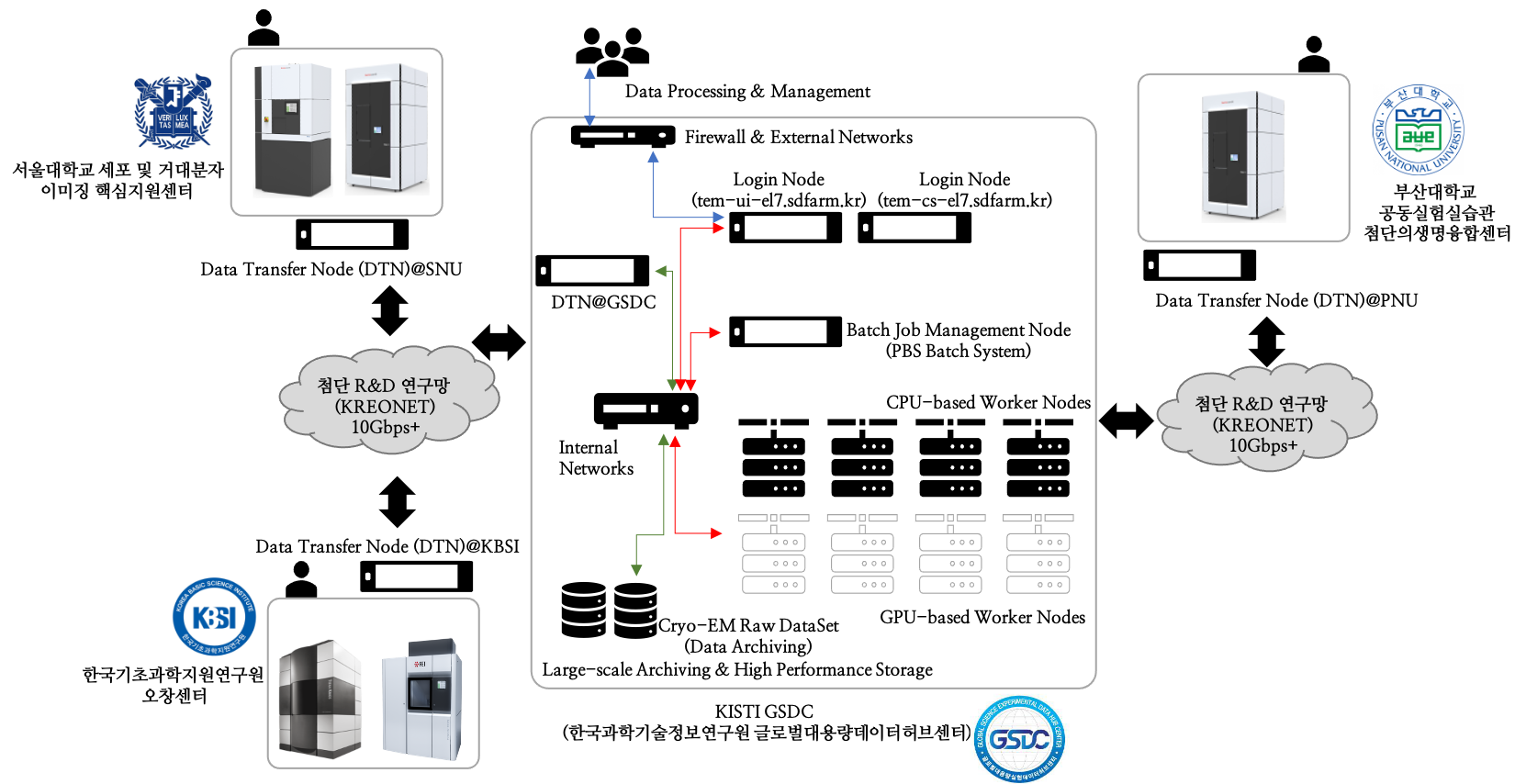
GSDC (Global Science experimental Data hub Center) provides data computing services, i.e., large-scale Cryo-EM data transfer, archiving and/or processing to Cryo-EM operators/users. Cryo-EM facilities which are operated by government-funded research institutes or academies, can be directly connected to GSDC via KREONET with 10+ Gbps dedicated/shared network links. GSDC also supports petabyes scale of high performance (and/or archiving) storages and CPU/GPU computing servers to help Cryo-EM users’ scientific discoveries. Here is GSDC’s computing and storage infrastructres for Cryo-EM operators/users.
Overall architecture between KBSI, SNU (Seoul National University), PNU (Pusan National University)’s Cryo-EM facilities and GSDC TEM computing cluster.
2. Computing and storage resources
Category |
Node Name (sdfarm.kr) |
Specification |
Resources size |
|---|---|---|---|
Login (CryoSPARC) |
tem-ui-el7 |
|
72 cores (H/T) |
Login (CryoSPARC) |
tem-cs-el7 |
|
56 cores (H/T) |
Master |
tem-ce-el7 |
|
56 cores (H/T) |
Workers |
tem-wn[1001-1002]-el7 |
|
380 cores |
tem-wn[1003-1013]-el7 |
|
||
tem-gpu[01-03]-el7 |
|
|
|
tem-gpu[04-05]-el7 |
|
||
tem-gpu[06-07]-el7 |
|
||
tem-gpu[08-10]-el7 |
|
||
Storage |
User home directory (Home) |
100GB per each user account (/tem/home) |
|
Data analysis (Scratch) |
80TB per each research group (/tem/scratch) |
||
Archive |
500TB per each Cryo-EM site (/tem/archive) |
||
Total |
772 CPU cores (physical), 26 GPGPUs, High Performance Storage |
||
3. Cluster management softwares
Category |
Name |
Description |
Version (modulepath) |
|---|---|---|---|
OS |
Scientific Linux |
Operating system |
7.9 |
System M/W |
Environment module |
|
v4.4.1 |
OpenPBS(torque) |
|
v6.1.2 |
|
OpenMPI |
|
v4.0.3
(mpi/gcc/openmpi/4.0.3)
(mpi/gcc/8.3.1/openmpi/4.0.3)
|
|
cuda |
|
9.2 (cuda/9.2)
11.2 (cuda/11.2)
|
|
Anaconda |
|
2020.11 (conda/2020.11) |
|
Python |
|
v2.7.5 |
4. Data analysis tools
Category |
Name |
Description |
Version (module path) |
|---|---|---|---|
Tools |
Relion |
A stand-alone computer program that employs an empirical Bayesian
approach to refinement of (multiple) 3D reconstructions or 2D
class averages in electron cryo-microscopy (cryo-EM).
|
v3.0.7
(apps/relion/cpu/3.0.7)
(apps/relion/gpu/3.0.7)
v3.1.0
(apps/relion/cpu/3.1.0)
(apps/relion/gpu/3.1.0)
v4.0.0
(apps/relion/cpu/4.0.0)
(apps/relion/gpu/4.0.0)
v4.0.1
(apps/relion/cpu/4.0.1)
(apps/relion/gpu/4.0.1)
v5.0.0
(apps/relion/cpu/5.0.0)
(apps/relion/gpu/5.0.0)
|
cisTEM |
User-friendly software to process cryo-EM images of
macromolecular complexes and obtain high-resolution 3D
reconstructions.
|
v1.0.0
(apps/cistem/1.0.0)
|
|
CryoSPARC |
CryoSPARC is the state-of-the-art platform used globally for
obtaining 3D structural information from single particle cryo-EM
data.
|
v3.0.1
v3.2.0
v4.0.0
v4.2.0
v4.4.0 and later
|
|
Topaz |
A pipeline for particle detection in cryoem images using
convolutional neural networks trained from positive and unlabeled
data.
|
v0.2.4
(topaz/cuda-9.2/0.2.4)
(topaz/cuda-11.0/0.2.4)
|
|
PyEM |
A collection of Python modules and command-line utilities for
electron microscopy of biological samples.
|
v0.5
(pyem/0.5)
|
|
Rosetta |
Software suite for computational modeling and analysis of protein
structures.
|
v3.13
(rosetta/openmpi-4.0.3/3.13)
(rosetta/mpich-3.4.3/3.13)
|
5. Understanding environment modules
The Environment Modules system is a tool to help users manage their Unix or Linux shell environment, by allowing groups of related environment-variable settings to be made or removed dynamically.
Listing available modules
$> module avail
-------- /tem/el7/Modules/apps --------
apps/cistem/1.0.0
apps/relion/cpu/4.0.0
apps/relion/cpu/4.0.1
apps/relion/cpu/5.0.0
apps/relion/gpu/4.0.0
apps/relion/gpu/4.0.1
apps/relion/gpu/5.0.0

---- /tem/el7/Modules/acceleration ----
cuda/9.2  cuda/11.2

-------- /tem/el7/Modules/mpi ---------
mpi/gcc/4.8.5/openmpi/4.0.3
mpi/gcc/8.3.1/mpich/3.4.3
mpi/gcc/8.3.1/openmpi/4.0.3
mpi/gcc/openmpi/4.0.3

----- /tem/el7/Modules/virtualenv -----
conda/2020.11  topaz/cuda-9.2/0.2.4
pyem/0.5       topaz/cuda-11.0/0.2.4

------- /tem/el7/Modules/tools --------
tools/aspera-cli/3.9.6
tools/ctffind/4.1.14
tools/gctf/1.18_b2
tools/motioncor2/1.3.1
tools/resmap/1.1.4
tools/summovie/1.0.2
tools/unblur/1.0.2

----- /tem/el7/Modules/experiment -----
PyRosetta/4
python/3.7
rosetta/mpich-3.4.3/3.13
rosetta/openmpi-4.0.3/3.13
Show module details
$> module show apps/relion/gpu/5.0.0

-------------------------------------------------------------------
/tem/el7/Modules/apps/apps/relion/gpu/5.0.0:

module-whatis   {Setups relion 5.0.0 environment variables}
module          load mpi/gcc/8.3.1/openmpi/4.0.3
module          load cuda/11.2
setenv          relion_version 5.0.0
prepend-path    PATH /tem/el7/relion-5.0.0/gpu/bin
prepend-path    LD_LIBRARY_PATH /tem/el7/relion-5.0.0/gpu/lib
setenv          LANG en_US.UTF-8
setenv          TORCH_HOME ~/.cache/torch
setenv          RELION_QUEUE_USE yes
setenv          RELION_QUEUE_NAME gpuQ
setenv          RELION_QSUB_COMMAND qsub
setenv          RELION_QSUB_EXTRA_COUNT 3
setenv          RELION_QSUB_EXTRA1 {Number of Nodes}
setenv          RELION_QSUB_EXTRA2 {Number of processes per each node}
setenv          RELION_QSUB_EXTRA3 {Number of GPUs per node}
setenv          RELION_QSUB_EXTRA1_DEFAULT 1
setenv          RELION_QSUB_EXTRA2_DEFAULT 3
setenv          RELION_QSUB_EXTRA3_DEFAULT 2
setenv          RELION_CTFFIND_EXECUTABLE /tem/el7/ctffind-4.1.14/bin/ctffind
setenv          RELION_GCTF_EXECUTABLE /tem/el7/Gctf_v1.18_b2/bin/Gctf_v1.18_b2_sm60_cu9.2
setenv          RELION_RESMAP_EXECUTABLE /tem/el7/ResMap-1.1.4/ResMap-1.1.4-linux64
setenv          RELION_MOTIONCOR2_EXECUTABLE /tem/el7/MotionCor2_v1.3.1/MotionCor2_v1.3.1-Cuda92
setenv          RELION_UNBLUR_EXECUTABLE /tem/el7/unblur_1.0.2/bin/unblur_openmp_7_17_15.exe
setenv          RELION_SUMMOVIE_EXECUTABLE /tem/el7/summovie_1.0.2/bin/sum_movie_openmp_7_17_15.exe
conflict        apps/relion
-------------------------------------------------------------------
Loading modules
$> module load <module_path>
or
$> module add <module_path>
e.g., $> module load apps/relion/gpu/5.0.0
Listing loaded modules
$> module load apps/relion/gpu/5.0.0
$> module list
Currently Loaded Modulefiles:
1) mpi/gcc/8.3.1/openmpi/4.0.3   2) cuda/11.2   3) apps/relion/gpu/5.0.0
Unloading modules
$> module unload <module_path>
or
$> module rm <module_path>
e.g., $> module unload apps/relion/gpu/5.0.0
Unloading all the modules
$> module purge
Module environment help
$> module --help
Modules Release 4.4.1 (2020-01-03)
Usage: module [options] [command] [args ...]

Loading / Unloading commands:
  add | load      modulefile [...]  Load modulefile(s)
  rm | unload     modulefile [...]  Remove modulefile(s)
  purge                             Unload all loaded modulefiles
  reload | refresh                  Unload then load all loaded modulefiles
  switch | swap   [mod1] mod2       Unload mod1 and load mod2

Listing / Searching commands:
  list            [-t|-l]           List loaded modules
  avail   [-d|-L] [-t|-l] [-S|-C] [--indepth|--no-indepth] [mod ...]
                                    List all or matching available modules
  aliases                           List all module aliases
  whatis          [modulefile ...]  Print whatis information of modulefile(s)
  apropos | keyword | search  str   Search all name and whatis containing str
  is-loaded       [modulefile ...]  Test if any of the modulefile(s) are loaded
  is-avail        modulefile [...]  Is any of the modulefile(s) available
  info-loaded     modulefile        Get full name of matching loaded module(s)

Collection of modules handling commands:
  save            [collection|file] Save current module list to collection
  restore         [collection|file] Restore module list from collection or file
  saverm          [collection]      Remove saved collection
  saveshow        [collection|file] Display information about collection
  savelist        [-t|-l]           List all saved collections
  is-saved        [collection ...]  Test if any of the collection(s) exists

Shell's initialization files handling commands:
  initlist                          List all modules loaded from init file
  initadd         modulefile [...]  Add modulefile to shell init file
  initrm          modulefile [...]  Remove modulefile from shell init file
  initprepend     modulefile [...]  Add to beginning of list in init file
  initswitch      mod1 mod2         Switch mod1 with mod2 from init file
  initclear                         Clear all modulefiles from init file

Environment direct handling commands:
  prepend-path [-d c] var val [...] Prepend value to environment variable
  append-path [-d c] var val [...]  Append value to environment variable
  remove-path [-d c] var val [...]  Remove value from environment variable

Other commands:
  help            [modulefile ...]  Print this or modulefile(s) help info
  display | show  modulefile [...]  Display information about modulefile(s)
  test            [modulefile ...]  Test modulefile(s)
  use     [-a|-p] dir [...]         Add dir(s) to MODULEPATH variable
  unuse           dir [...]         Remove dir(s) from MODULEPATH variable
  is-used         [dir ...]         Is any of the dir(s) enabled in MODULEPATH
  path            modulefile        Print modulefile path
  paths           modulefile        Print path of matching available modules
  clear           [-f]              Reset Modules-specific runtime information
  source          scriptfile [...]  Execute scriptfile(s)
  config [--dump-state|name [val]]  Display or set Modules configuration

Switches:
  -t | --terse    Display output in terse format
  -l | --long     Display output in long format
  -d | --default  Only show default versions available
  -L | --latest   Only show latest versions available
  -S | --starts-with
                  Search modules whose name begins with query string
  -C | --contains Search modules whose name contains query string
  -i | --icase    Case insensitive match
  -a | --append   Append directory to MODULEPATH
  -p | --prepend  Prepend directory to MODULEPATH
  --auto          Enable automated module handling mode
  --no-auto       Disable automated module handling mode
  -f | --force    By-pass dependency consistency or confirmation dialog

Options:
  -h | --help     This usage info
  -V | --version  Module version
  -D | --debug    Enable debug messages
  -v | --verbose  Enable verbose messages
  -s | --silent   Turn off error, warning and informational messages
  --paginate      Pipe mesg output into a pager if stream attached to terminal
  --no-pager      Do not pipe message output into a pager
  --color[=WHEN]  Colorize the output; WHEN can be 'always' (default if
                  omitted), 'auto' or 'never'
6. Batch systems (PBS job manager)
Resources manager and job scheduler
Resource manager : OpenPBS v6.1.2
Job scheduler : OpenPBS default FIFO job scheduler
Directives in PBS job scripts
PBS defines some useful directives (starting with '#PBS') which can be used to describe job’s resources requirements. Users must include those directives in job scripts to submit and execute jobs. The order of directives is not important, but the directives must be written prior to job execution commands.
Resource limits
The “-l” option is used to request resources, including nodes, memory, time, etc.
Nodes and PPN (Processor Per Node)
To request a single core on the farm:
#PBS -l nodes=1:ppn=1

To request one whole node on the farm:
#PBS -l nodes=1:ppn=28

To request 4 whole nodes on the farm:
#PBS -l nodes=4:ppn=28

To request 3 whole nodes with 2 GPUs on the farm:
#PBS -l nodes=3:ppn=28:gpus=2

To request 1 node with use of 6 cores and 1 GPU:
#PBS -l nodes=1:ppn=6:gpus=1
Wall clock time
To request 20 hours of wall clock time:
#PBS -l walltime=20:00:00
If a computational job will have not finished yet until the specified wall clock time, PBS will release the resources that are allocated to the job and stop the job’s runnning. If you don’t define walltime, the default value is “infinite”.
Memory
To request 4GB memory:
#PBS -l mem=4GB
or
#PBS -l mem=4000MB

To request 24GB memory:
#PBS -l mem=24000MB
Job name
You can define a job name using “-N” option. If you omit this directive, the default job name is the same as the file name of job script.
#PBS -N jobName
Queue name
In general, a “queue” can be thought of a mapped set of computing resources. You can specify a queue name (using “-q” option) which the job is enqueued to.
#PBS -q cpuQ
Job log files
When PBS executes an user’s job, PBS creates 2 different types of log files (standard output stream and standart error stream) by default. If the job’s name is “jobName” and the submitted job ID is “123456”, you can find 2 files (jobName.o123456 and jobName.e123456) that are created in the job execution base directory. You can also merge the two streams into one file using “-j oe” option. In that case, jobName.o1234567 file contains the standard error stream.
#PBS -j oe
PBS job script examples
Simple sequential job
#PBS -N jobName
#PBS -l walltime=40:00:00
#PBS -l nodes=1:ppn=1
#PBS -q cpuQ

cd $PBS_O_WORKDIR
/usr/bin/time ./mysci > mysci.hist
Serial job with OpenMP multithreading
#PBS -N jobName
#PBS -l walltime=1:00:00
#PBS -l nodes=1:ppn=28
#PBS -q cpuQ

export OMP_NUM_THREADS=28
cd $PBS_O_WORKDIR
./a.out > my_results
Simple MPI parallel job
Here is an example of an MPI job that uses 4 nodes with 4 cores each, running one process per core (16 processes total).
#PBS -N jobName
#PBS -l walltime=10:00:00
#PBS -l nodes=4:ppn=4
#PBS -q cpuQ

module load mpi/gcc/openmpi/4.0.3
cd $PBS_O_WORKDIR
mpirun -machinefile $PBS_NODEFILE ./a.out
Parallel job with MPI and OpenMP
This example is a hybrid MPI/OpenMP job. It runs one MPI process per node with 28 threads per process. The assumption here is that the code was written to support multi-level parallelism.
#PBS -N jobName
#PBS -l walltime=20:00:00
#PBS -l nodes=4:ppn=28
#PBS -q cpuQ

module load mpi/gcc/openmpi/4.0.3
export OMP_NUM_THREADS=28
cd $PBS_O_WORKDIR
mpirun --bynode -machinefile $PBS_NODEFILE ./a.out
Job submission
myscript.job : the script file name of a PBS batch job
$> qsub myscript.job
In response to this command you’ll see a line with your job ID:
123456.tem-ce.sdfarm.kr
Monitoring and managing your jobs
Status of queued jobs
qstat
Use the qstat command to check the status of your jobs. You can see whether your job is queued or running, along with information about requested resources. If the job is running you can see elapsed time and resources used.
### By itself, qstat lists all jobs in the system in standard or alternate format:
$> qstat
or
$> qstat -a

### qstat with -ns option lists all jobs with showing the assigned nodes for each job:
$> qstat -ns

### To list all the jobs belonging to a particular user:
$> qstat -u tem_user

### To list the status of a particular job, in standard or alternate format:
$> qstat 123456
$> qstat -a 123456

### To get all the details about a particular job (full status):
$> qstat -f 123456

### To list the status of all the queues
$> qstat -Qf
Managing your jobs
Deleting (canceling) a job
Situations may arise in which you want to delete one of your jobs from the PBS queue. Perhaps you set the resource limits incorrectly, neglected to copy an input file, or had incorrect or missing commands in the batch file. Or maybe the program is taking too long to run (infinite loop). The PBS command to delete a batch job is qdel. It applies to both queued and running jobs.
$> qdel 123456
Altering a queued job
You can alter certain attributes of your job while it’s in the queue using the qalter command. This can be useful if you want to make a change without losing your place in the queue. You cannot make any alterations to the executable portion of the script, nor can you make any changes after the job starts running. The options argument consists of one or more PBS directives in the form of command-line options. For example, to change the walltime limit on job 123456 to 5 hours and have email sent when the job ends (only):
### The syntax is: qalter [options ...] jobid
$> qalter -l walltime=5:00:00 -m e 123456
7. Module paths and job submission templates
Module paths for data analysis tools
$> module avail
-------- /tem/el7/Modules/apps ---------
apps/cistem/1.0.0
apps/relion/cpu/4.0.0
apps/relion/cpu/4.0.1
apps/relion/cpu/5.0.0
apps/relion/gpu/4.0.0
apps/relion/gpu/4.0.1
apps/relion/gpu/5.0.0

---- /tem/el7/Modules/acceleration -----
cuda/9.2  cuda/11.2

--------- /tem/el7/Modules/mpi ---------
mpi/gcc/8.3.1/mpich/3.4.3
mpi/gcc/8.3.1/openmpi/4.0.3
mpi/gcc/openmpi/4.0.3

----- /tem/el7/Modules/virtualenv ------
conda/2020.11
pyem/0.5
topaz/cuda-9.2/0.2.4
topaz/cuda-11.0/0.2.4

-------- /tem/el7/Modules/tools --------
tools/aspera-cli/3.9.6
tools/ctffind/4.1.14
tools/gctf/1.18_b2
tools/motioncor2/1.3.1
tools/resmap/1.1.4
tools/summovie/1.0.2
tools/unblur/1.0.2

----- /tem/el7/Modules/experiment ------
devel/python/3.7
PyRosetta/4
rosetta/mpich-3.4.3/3.13
rosetta/openmpi-4.0.3/3.13
Job submission templates
## output, error 로그 파일을 생성하지 않는 cisTEM 작업 템플릿
/tem/el7/qsub-cisTEM-cpu-noout.sh
## output, error 로그 파일을 생성하는 cisTEM 작업 템플릿
/tem/el7/qsub-cisTEM-cpu.sh
## Relion 3.0.7 CPU MPI 작업 템플릿
/tem/el7/qsub-relion-3.0.7-cpu.bash
## Relion 3.0.7 GPU 가속 활용하는 MPI 작업 템플릿
/tem/el7/qsub-relion-3.0.7-gpu.bash

## Relion 4.0.0 CPU MPI 작업 템플릿
/tem/el7/qsub-relion-4.0.0-cpu.bash
## Relion 4.0.0 GPU 가속 활용하는 MPI 작업 템플릿
/tem/el7/qsub-relion-4.0.0-gpu.bash
## Relion 4.0.0 에서 external job 으로 topaz 소프트웨어를 사용하는 작업 템플릿
/tem/el7/qsub-relion-4.0.0-topaz.bash

## Relion 4.0.1 CPU MPI 작업 템플릿
/tem/el7/qsub-relion-4.0.1-cpu.bash
## Relion 4.0.1 GPU 가속 활용하는 MPI 작업 템플릿
/tem/el7/qsub-relion-4.0.1-gpu.bash
## Relion 4.0.1 에서 external job 으로 topaz 소프트웨어를 사용하는 작업 템플릿
/tem/el7/qsub-relion-4.0.1-topaz.bash

## Relion 5.0.0 CPU MPI 작업 템플릿
/tem/el7/qsub-relion-5.0.0-cpu.bash
## Relion 5.0.0 GPU 가속 활용하는 MPI 작업 템플릿
/tem/el7/qsub-relion-5.0.0-gpu.bash
## Relion 5.0.0 에서 external job 으로 topaz 소프트웨어를 사용하는 작업 템플릿
/tem/el7/qsub-relion-5.0.0-topaz.bash
8. Batch queues
Category |
Queue Name |
Assigned Computing Resources |
Remarks |
|---|---|---|---|
Shared |
cpuQ |
|
|
gpuQ |
|
|
Checking batch queue names and their status
$> qstat -Qf
Queue: cpuQ
  queue_type = Execution
  total_jobs = 0
  state_count = Transit:0 Queued:0 Held:0 Waiting:0 Running:0 Exiting:0 Complete:0
  resources_default.neednodes = cpuQ
  resources_default.nodes = 1
  acl_group_enable = True
  acl_groups = tem_users
  acl_group_sloppy = True
  mtime = 1610553300
  resources_assigned.nodect = 0
  enabled = True
  started = True

Queue: gpuQ
  queue_type = Execution
  total_jobs = 0
  state_count = Transit:0 Queued:0 Held:0 Waiting:0 Running:0 Exiting:0 Complete:0
  resources_default.neednodes = gpuQ
  resources_default.nodes = 1
  acl_group_enable = True
  acl_groups = tem_users
  acl_group_sloppy = True
  mtime = 1610553300
  resources_assigned.nodect = 0
  enabled = True
  started = True
Checking all worker nodes status
$> pbsnodes -a
tem-wn1001-el7.sdfarm.kr
  state = free
  power_state = Running
  np = 36
  properties = cpuQ
  ntype = cluster
  status = opsys=linux,uname=Linux tem-wn1001-el7.sdfarm.kr 3.10.0-1160.6.1.el7.x86_64 #1 SMP Tue Nov 10 08:19:23 CST 2020 x86_64,sessions=2125,nsessions=1,nusers=1,idletime=3189604,totmem=400927652kb,availmem=386021536kb,physmem=394636200kb,ncpus=36,loadave=0.02,gres=,netload=368024574355580,state=free,varattr= ,cpuclock=Fixed,macaddr=34:80:0d:46:cc:88,version=6.1.2,rectime=1610587316,jobs=
  mom_service_port = 15002
  mom_manager_port = 15003

tem-wn1002-el7.sdfarm.kr
  state = free
  power_state = Running
  np = 36
  properties = cpuQ
  ntype = cluster
  status = opsys=linux,uname=Linux tem-wn1002-el7.sdfarm.kr 3.10.0-1160.2.2.el7.x86_64 #1 SMP Mon Oct 19 10:20:12 CDT 2020 x86_64,sessions=1980,nsessions=1,nusers=1,idletime=3189585,totmem=400927812kb,availmem=386052592kb,physmem=394636360kb,ncpus=36,loadave=0.00,gres=,netload=467274352677137,state=free,varattr= ,cpuclock=Fixed,macaddr=f4:e9:d4:67:a5:0c,version=6.1.2,rectime=1610587321,jobs=
  mom_service_port = 15002
  mom_manager_port = 15003

tem-wn1003-el7.sdfarm.kr
  state = free
  power_state = Running
  np = 28
  properties = cpuQ
  ntype = cluster
  status = opsys=linux,uname=Linux tem-wn1003-el7.sdfarm.kr 3.10.0-1160.11.1.el7.x86_64 #1 SMP Tue Dec 15 08:51:23 CST 2020 x86_64,sessions=16988 30464,nsessions=2,nusers=2,idletime=77442,totmem=204113112kb,availmem=197470212kb,physmem=197821660kb,ncpus=28,loadave=0.00,gres=,netload=7771760205,state=free,varattr= ,cpuclock=Fixed,macaddr=24:6e:96:01:df:d0,version=6.1.2,rectime=1610587306,jobs=
  mom_service_port = 15002
  mom_manager_port = 15003

tem-wn1004-el7.sdfarm.kr
  state = free
  power_state = Running
  np = 28
  properties = cpuQ
  ntype = cluster
  status = opsys=linux,uname=Linux tem-wn1004-el7.sdfarm.kr 3.10.0-1160.11.1.el7.x86_64 #1 SMP Tue Dec 15 08:51:23 CST 2020 x86_64,sessions=21911,nsessions=1,nusers=1,idletime=84377,totmem=204113112kb,availmem=197460724kb,physmem=197821660kb,ncpus=28,loadave=0.19,gres=,netload=9209594231,state=free,varattr= ,cpuclock=Fixed,macaddr=24:6e:96:01:df:c0,version=6.1.2,rectime=1610587297,jobs=
  mom_service_port = 15002
  mom_manager_port = 15003

tem-wn1005-el7.sdfarm.kr
  state = free
  power_state = Running
  np = 28
  properties = cpuQ
  ntype = cluster
  status = opsys=linux,uname=Linux tem-wn1005-el7.sdfarm.kr 3.10.0-1160.11.1.el7.x86_64 #1 SMP Tue Dec 15 08:51:23 CST 2020 x86_64,sessions=2032,nsessions=1,nusers=1,idletime=84135,totmem=204113112kb,availmem=197566008kb,physmem=197821660kb,ncpus=28,loadave=0.00,gres=,netload=9652090409,state=free,varattr= ,cpuclock=Fixed,macaddr=24:6e:96:02:de:b0,version=6.1.2,rectime=1610587295,jobs=
  mom_service_port = 15002
  mom_manager_port = 15003

tem-wn1006-el7.sdfarm.kr
  state = free
  power_state = Running
  np = 28
  properties = cpuQ
  ntype = cluster
  status = opsys=linux,uname=Linux tem-wn1006-el7.sdfarm.kr 3.10.0-1160.11.1.el7.x86_64 #1 SMP Tue Dec 15 08:51:23 CST 2020 x86_64,sessions=22262,nsessions=1,nusers=1,idletime=84367,totmem=204113112kb,availmem=197470252kb,physmem=197821660kb,ncpus=28,loadave=0.00,gres=,netload=9653528113,state=free,varattr= ,cpuclock=Fixed,macaddr=24:6e:96:01:e1:70,version=6.1.2,rectime=1610587303,jobs=
  mom_service_port = 15002
  mom_manager_port = 15003

tem-wn1007-el7.sdfarm.kr
  state = free
  power_state = Running
  np = 28
  properties = cpuQ
  ntype = cluster
  status = opsys=linux,uname=Linux tem-wn1007-el7.sdfarm.kr 3.10.0-1160.11.1.el7.x86_64 #1 SMP Tue Dec 15 08:51:23 CST 2020 x86_64,sessions=15172,nsessions=1,nusers=1,idletime=84349,totmem=204113112kb,availmem=197490356kb,physmem=197821660kb,ncpus=28,loadave=0.08,gres=,netload=7246363991,state=free,varattr= ,cpuclock=Fixed,macaddr=24:6e:96:02:e3:80,version=6.1.2,rectime=1610587301,jobs=
  mom_service_port = 15002
  mom_manager_port = 15003

tem-wn1008-el7.sdfarm.kr
  state = free
  power_state = Running
  np = 28
  properties = cpuQ
  ntype = cluster
  status = opsys=linux,uname=Linux tem-wn1008-el7.sdfarm.kr 3.10.0-1160.11.1.el7.x86_64 #1 SMP Tue Dec 15 08:51:23 CST 2020 x86_64,sessions=22147,nsessions=1,nusers=1,idletime=84323,totmem=204113112kb,availmem=197470664kb,physmem=197821660kb,ncpus=28,loadave=0.00,gres=,netload=6170249241,state=free,varattr= ,cpuclock=Fixed,macaddr=24:6e:96:02:df:50,version=6.1.2,rectime=1610587299,jobs=
  mom_service_port = 15002
  mom_manager_port = 15003

tem-wn1009-el7.sdfarm.kr
   state = job-exclusive
   power_state = Running
   np = 28
   properties = cpuQ
   ntype = cluster
   jobs = 0-13/307.tem-ce-el7.sdfarm.kr,14-27/308.tem-ce-el7.sdfarm.kr
   status = opsys=linux,uname=Linux tem-wn1009-el7.sdfarm.kr 3.10.0-1160.11.1.el7.x86_64 #1 SMP Tue Dec 15 08:51:23 CST 2020 x86_64,sessions=1637 21403 21462,nsessions=3,nusers=2,idletime=124523,totmem=204113112kb,availmem=82190600kb,physmem=197821660kb,ncpus=28,loadave=28.02,gres=,netload=5715573075825,state=free,varattr= ,cpuclock=Fixed,macaddr=ec:f4:bb:e9:cd:28,version=6.1.2,rectime=1611712971,jobs=307.tem-ce-el7.sdfarm.kr 308.tem-ce-el7.sdfarm.kr
   mom_service_port = 15002
   mom_manager_port = 15003

tem-wn1010-el7.sdfarm.kr
   state = job-exclusive
   power_state = Running
   np = 28
   properties = cpuQ
   ntype = cluster
   jobs = 0-13/307.tem-ce-el7.sdfarm.kr,14-27/308.tem-ce-el7.sdfarm.kr
   status = opsys=linux,uname=Linux tem-wn1010-el7.sdfarm.kr 3.10.0-1160.11.1.el7.x86_64 #1 SMP Tue Dec 15 08:51:23 CST 2020 x86_64,sessions=10683 10742 21656,nsessions=3,nusers=2,idletime=125228,totmem=204113112kb,availmem=82076700kb,physmem=197821660kb,ncpus=28,loadave=28.41,gres=,netload=10000812494662,state=free,varattr= ,cpuclock=Fixed,macaddr=ec:f4:bb:e9:c8:e0,version=6.1.2,rectime=1611712972,jobs=307.tem-ce-el7.sdfarm.kr 308.tem-ce-el7.sdfarm.kr
   mom_service_port = 15002
   mom_manager_port = 15003

tem-wn1011-el7.sdfarm.kr
   state = job-exclusive
   power_state = Running
   np = 28
   properties = cpuQ
   ntype = cluster
   jobs = 0-13/307.tem-ce-el7.sdfarm.kr,14-27/308.tem-ce-el7.sdfarm.kr
   status = opsys=linux,uname=Linux tem-wn1011-el7.sdfarm.kr 3.10.0-1160.11.1.el7.x86_64 #1 SMP Tue Dec 15 08:51:23 CST 2020 x86_64,sessions=10368 10428 21655,nsessions=3,nusers=2,idletime=128086,totmem=204113112kb,availmem=81587604kb,physmem=197821660kb,ncpus=28,loadave=28.16,gres=,netload=5807235665327,state=free,varattr= ,cpuclock=Fixed,macaddr=ec:f4:bb:e9:bf:28,version=6.1.2,rectime=1611712972,jobs=307.tem-ce-el7.sdfarm.kr 308.tem-ce-el7.sdfarm.kr
   mom_service_port = 15002
   mom_manager_port = 15003

tem-wn1012-el7.sdfarm.kr
   state = job-exclusive
   power_state = Running
   np = 28
   properties = cpuQ
   ntype = cluster
   jobs = 0-13/307.tem-ce-el7.sdfarm.kr,14-27/308.tem-ce-el7.sdfarm.kr
   status = opsys=linux,uname=Linux tem-wn1012-el7.sdfarm.kr 3.10.0-1160.11.1.el7.x86_64 #1 SMP Tue Dec 15 08:51:23 CST 2020 x86_64,sessions=10379 10475 21655,nsessions=3,nusers=2,idletime=127792,totmem=204113112kb,availmem=84717576kb,physmem=197821660kb,ncpus=28,loadave=28.27,gres=,netload=10075699597211,state=free,varattr= ,cpuclock=Fixed,macaddr=24:6e:96:02:de:d0,version=6.1.2,rectime=1611712971,jobs=307.tem-ce-el7.sdfarm.kr 308.tem-ce-el7.sdfarm.kr
   mom_service_port = 15002
   mom_manager_port = 15003

tem-gpu01-el7.sdfarm.kr
  state = free
  power_state = Running
  np = 28
  properties = gpuQ
  ntype = cluster
  status = opsys=linux,uname=Linux tem-gpu01-el7.sdfarm.kr 3.10.0-1160.11.1.el7.x86_64 #1 SMP Tue Dec 15 08:51:23 CST 2020 x86_64,sessions=1823 4268,nsessions=2,nusers=2,idletime=36086,totmem=402281596kb,availmem=390304804kb,physmem=395990144kb,ncpus=28,loadave=0.05,gres=,netload=2091843090,state=free,varattr= ,cpuclock=Fixed,macaddr=24:6e:96:77:a0:80,version=6.1.2,rectime=1610587294,jobs=
  mom_service_port = 15002
  mom_manager_port = 15003
  gpus = 2
  gpu_status = gpu[1]=gpu_id=00000000:82:00.0;gpu_pci_device_id=368578782;gpu_pci_location_id=00000000:82:00.0;gpu_product_name=Tesla P100-PCIE-16GB;gpu_memory_total=16280 MB;gpu_memory_used=0 MB;gpu_mode=Default;gpu_state=Unallocated;gpu_utilization=0%;gpu_memory_utilization=0%;gpu_ecc_mode=Enabled;gpu_single_bit_ecc_errors=0;gpu_double_bit_ecc_errors=0;gpu_temperature=28 C,gpu[0]=gpu_id=00000000:03:00.0;gpu_pci_device_id=368578782;gpu_pci_location_id=00000000:03:00.0;gpu_product_name=Tesla P100-PCIE-16GB;gpu_memory_total=16280 MB;gpu_memory_used=0 MB;gpu_mode=Default;gpu_state=Unallocated;gpu_utilization=0%;gpu_memory_utilization=0%;gpu_ecc_mode=Enabled;gpu_single_bit_ecc_errors=0;gpu_double_bit_ecc_errors=0;gpu_temperature=29 C;gpu_display=Enabled,gpu_display=Enabled,driver_ver=460.27.04,timestamp=Thu Jan 14 10:21:33 2021

tem-gpu02-el7.sdfarm.kr
  state = free
  power_state = Running
  np = 28
  properties = gpuQ
  ntype = cluster
  status = opsys=linux,uname=Linux tem-gpu02-el7.sdfarm.kr 3.10.0-1160.11.1.el7.x86_64 #1 SMP Tue Dec 15 08:51:23 CST 2020 x86_64,sessions=2142,nsessions=1,nusers=1,idletime=35378,totmem=402277340kb,availmem=390086436kb,physmem=395985888kb,ncpus=56,loadave=0.09,gres=,netload=2464164051,state=free,varattr= ,cpuclock=Fixed,macaddr=24:6e:96:77:9b:30,version=6.1.2,rectime=1610587314,jobs=
  mom_service_port = 15002
  mom_manager_port = 15003
  gpus = 2
  gpu_status = gpu[1]=gpu_id=00000000:82:00.0;gpu_pci_device_id=368578782;gpu_pci_location_id=00000000:82:00.0;gpu_product_name=Tesla P100-PCIE-16GB;gpu_memory_total=16280 MB;gpu_memory_used=0 MB;gpu_mode=Default;gpu_state=Unallocated;gpu_utilization=0%;gpu_memory_utilization=0%;gpu_ecc_mode=Enabled;gpu_single_bit_ecc_errors=0;gpu_double_bit_ecc_errors=0;gpu_temperature=27 C,gpu[0]=gpu_id=00000000:03:00.0;gpu_pci_device_id=368578782;gpu_pci_location_id=00000000:03:00.0;gpu_product_name=Tesla P100-PCIE-16GB;gpu_memory_total=16280 MB;gpu_memory_used=0 MB;gpu_mode=Default;gpu_state=Unallocated;gpu_utilization=0%;gpu_memory_utilization=0%;gpu_ecc_mode=Enabled;gpu_single_bit_ecc_errors=0;gpu_double_bit_ecc_errors=0;gpu_temperature=33 C;gpu_display=Enabled,gpu_display=Enabled,driver_ver=460.27.04,timestamp=Thu Jan 14 10:21:52 2021

tem-gpu03-el7.sdfarm.kr
  state = free
  power_state = Running
  np = 28
  properties = gpuQ
  ntype = cluster
  status = opsys=linux,uname=Linux tem-gpu03-el7.sdfarm.kr 3.10.0-1160.11.1.el7.x86_64 #1 SMP Tue Dec 15 08:51:23 CST 2020 x86_64,sessions=1816,nsessions=1,nusers=1,idletime=34739,totmem=402281596kb,availmem=390290980kb,physmem=395990144kb,ncpus=28,loadave=0.10,gres=,netload=1338950655,state=free,varattr= ,cpuclock=Fixed,macaddr=24:6e:96:77:9b:10,version=6.1.2,rectime=1610587315,jobs=
  mom_service_port = 15002
  mom_manager_port = 15003
  gpus = 2
  gpu_status = gpu[1]=gpu_id=00000000:82:00.0;gpu_pci_device_id=368578782;gpu_pci_location_id=00000000:82:00.0;gpu_product_name=Tesla P100-PCIE-16GB;gpu_memory_total=16280 MB;gpu_memory_used=0 MB;gpu_mode=Default;gpu_state=Unallocated;gpu_utilization=0%;gpu_memory_utilization=0%;gpu_ecc_mode=Enabled;gpu_single_bit_ecc_errors=0;gpu_double_bit_ecc_errors=0;gpu_temperature=29 C,gpu[0]=gpu_id=00000000:03:00.0;gpu_pci_device_id=368578782;gpu_pci_location_id=00000000:03:00.0;gpu_product_name=Tesla P100-PCIE-16GB;gpu_memory_total=16280 MB;gpu_memory_used=0 MB;gpu_mode=Default;gpu_state=Unallocated;gpu_utilization=0%;gpu_memory_utilization=0%;gpu_ecc_mode=Enabled;gpu_single_bit_ecc_errors=0;gpu_double_bit_ecc_errors=0;gpu_temperature=28 C;gpu_display=Enabled,gpu_display=Enabled,driver_ver=460.27.04,timestamp=Thu Jan 14 10:21:53 2021

tem-gpu04-el7.sdfarm.kr
   state = free
   power_state = Running
   np = 28
   properties = gpuQ
   ntype = cluster
   status = opsys=linux,uname=Linux tem-gpu04-el7.sdfarm.kr 3.10.0-1160.11.1.el7.x86_64 #1 SMP Tue Dec 15 08:51:23 CST 2020 x86_64,sessions=2041,nsessions=1,nusers=1,idletime=63469,totmem=137732192kb,availmem=132548340kb,physmem=131440740kb,ncpus=48,loadave=0.10,gres=,netload=790032261080,state=free,varattr= ,cpuclock=Fixed,macaddr=e4:43:4b:07:8c:f0,version=6.1.2,rectime=1611712958,jobs=
   mom_service_port = 15002
   mom_manager_port = 15003
   gpus = 2
   gpu_status = gpu[1]=gpu_id=00000000:AF:00.0;gpu_pci_device_id=456659166;gpu_pci_location_id=00000000:AF:00.0;gpu_product_name=Tesla P40;gpu_memory_total=22919 MB;gpu_memory_used=0 MB;gpu_mode=Default;gpu_state=Unallocated;gpu_utilization=0%;gpu_memory_utilization=0%;gpu_ecc_mode=Enabled;gpu_single_bit_ecc_errors=0;gpu_double_bit_ecc_errors=0;gpu_temperature=28 C,gpu[0]=gpu_id=00000000:3B:00.0;gpu_pci_device_id=456659166;gpu_pci_location_id=00000000:3B:00.0;gpu_product_name=Tesla P40;gpu_memory_total=22919 MB;gpu_memory_used=0 MB;gpu_mode=Default;gpu_state=Unallocated;gpu_utilization=0%;gpu_memory_utilization=0%;gpu_ecc_mode=Enabled;gpu_single_bit_ecc_errors=0;gpu_double_bit_ecc_errors=0;gpu_temperature=25 C;gpu_display=Enabled,gpu_display=Enabled,driver_ver=460.32.03,timestamp=Wed Jan 27 11:02:37 2021

tem-gpu05-el7.sdfarm.kr
   state = free
   power_state = Running
   np = 28
   properties = gpuQ
   ntype = cluster
   status = opsys=linux,uname=Linux tem-gpu05-el7.sdfarm.kr 3.10.0-1160.11.1.el7.x86_64 #1 SMP Tue Dec 15 08:51:23 CST 2020 x86_64,sessions=2352,nsessions=1,nusers=1,idletime=63492,totmem=269906392kb,availmem=261305348kb,physmem=263614940kb,ncpus=72,loadave=0.13,gres=,netload=808539072,state=free,varattr= ,cpuclock=Fixed,macaddr=e4:43:4b:03:78:38,version=6.1.2,rectime=1611712989,jobs=
   mom_service_port = 15002
   mom_manager_port = 15003
   gpus = 2
   gpu_status = gpu[1]=gpu_id=00000000:AF:00.0;gpu_pci_device_id=456659166;gpu_pci_location_id=00000000:AF:00.0;gpu_product_name=Tesla P40;gpu_memory_total=22919 MB;gpu_memory_used=0 MB;gpu_mode=Default;gpu_state=Unallocated;gpu_utilization=0%;gpu_memory_utilization=0%;gpu_ecc_mode=Enabled;gpu_single_bit_ecc_errors=0;gpu_double_bit_ecc_errors=0;gpu_temperature=30 C,gpu[0]=gpu_id=00000000:3B:00.0;gpu_pci_device_id=456659166;gpu_pci_location_id=00000000:3B:00.0;gpu_product_name=Tesla P40;gpu_memory_total=22919 MB;gpu_memory_used=0 MB;gpu_mode=Default;gpu_state=Unallocated;gpu_utilization=0%;gpu_memory_utilization=0%;gpu_ecc_mode=Enabled;gpu_single_bit_ecc_errors=0;gpu_double_bit_ecc_errors=0;gpu_temperature=27 C;gpu_display=Enabled,gpu_display=Enabled,driver_ver=460.32.03,timestamp=Wed Jan 27 11:03:08 2021

tem-gpu06-el7.sdfarm.kr
   state = free
   power_state = Running
   np = 32
   properties = gpuQ,gpuQA100
   ntype = cluster
   status = opsys=linux,uname=Linux tem-gpu06-el7.sdfarm.kr 3.10.0-1160.49.1.el7.x86_64 #1 SMP Tue Nov 23 21:51:54 CST 2021 x86_64,sessions=1853,nsessions=1,nusers=1,idletime=78369,totmem=402049028kb,availmem=396843552kb,physmem=395757576kb,ncpus=32,loadave=0.34,gres=,netload=2752372686,state=free,varattr= ,cpuclock=Fixed,macaddr=f4:03:43:e5:19:40,version=6.1.2,rectime=1639028497,jobs=
   mom_service_port = 15002
   mom_manager_port = 15003
   gpus = 2
   gpu_status = gpu[1]=gpu_id=00000000:D8:00.0;gpu_pci_device_id=552669406;gpu_pci_location_id=00000000:D8:00.0;gpu_product_name=NVIDIA A100-PCIE-40GB;gpu_memory_total=40536 MB;gpu_memory_used=0 MB;gpu_mode=Default;gpu_state=Unallocated;gpu_utilization=30%;gpu_memory_utilization=0%;gpu_ecc_mode=Enabled;gpu_single_bit_ecc_errors=0;gpu_double_bit_ecc_errors=0;gpu_temperature=72 C,gpu[0]=gpu_id=00000000:86:00.0;gpu_pci_device_id=552669406;gpu_pci_location_id=00000000:86:00.0;gpu_product_name=NVIDIA A100-PCIE-40GB;gpu_memory_total=40536 MB;gpu_memory_used=0 MB;gpu_mode=Default;gpu_state=Unallocated;gpu_utilization=0%;gpu_memory_utilization=0%;gpu_ecc_mode=Enabled;gpu_single_bit_ecc_errors=0;gpu_double_bit_ecc_errors=0;gpu_temperature=73 C;gpu_display=Enabled,gpu_display=Enabled,driver_ver=495.29.05,timestamp=Thu Dec  9 14:41:35 2021

tem-gpu07-el7.sdfarm.kr
   state = free
   power_state = Running
   np = 32
   properties = gpuQ,gpuQA100
   ntype = cluster
   status = opsys=linux,uname=Linux tem-gpu07-el7.sdfarm.kr 3.10.0-1160.49.1.el7.x86_64 #1 SMP Tue Nov 23 21:51:54 CST 2021 x86_64,sessions=1855 2925,nsessions=2,nusers=2,idletime=77023,totmem=402049028kb,availmem=396857460kb,physmem=395757576kb,ncpus=32,loadave=0.05,gres=,netload=2832872237,state=free,varattr= ,cpuclock=Fixed,macaddr=f4:03:43:e5:19:20,version=6.1.2,rectime=1639028495,jobs=
   mom_service_port = 15002
   mom_manager_port = 15003
   gpus = 2
   gpu_status = gpu[1]=gpu_id=00000000:D8:00.0;gpu_pci_device_id=552669406;gpu_pci_location_id=00000000:D8:00.0;gpu_product_name=NVIDIA A100-PCIE-40GB;gpu_memory_total=40536 MB;gpu_memory_used=0 MB;gpu_mode=Default;gpu_state=Unallocated;gpu_utilization=31%;gpu_memory_utilization=0%;gpu_ecc_mode=Enabled;gpu_single_bit_ecc_errors=0;gpu_double_bit_ecc_errors=0;gpu_temperature=74 C,gpu[0]=gpu_id=00000000:86:00.0;gpu_pci_device_id=552669406;gpu_pci_location_id=00000000:86:00.0;gpu_product_name=NVIDIA A100-PCIE-40GB;gpu_memory_total=40536 MB;gpu_memory_used=0 MB;gpu_mode=Default;gpu_state=Unallocated;gpu_utilization=0%;gpu_memory_utilization=0%;gpu_ecc_mode=Enabled;gpu_single_bit_ecc_errors=0;gpu_double_bit_ecc_errors=0;gpu_temperature=73 C;gpu_display=Enabled,gpu_display=Enabled,driver_ver=495.29.05,timestamp=Thu Dec  9 14:41:33 2021

tem-gpu08-el7.sdfarm.kr
   state = free
   power_state = Running
   np = 32
   properties = gpuQ
   ntype = cluster
   jobs = 0-7/26246.tem-ce-el7.sdfarm.kr,8-15/26247.tem-ce-el7.sdfarm.kr
   status = opsys=linux,uname=Linux tem-gpu08-el7.sdfarm.kr 3.10.0-1160.el7.x86_64 #1 SMP Wed Sep 30 08:53:05 CDT 2020 x86_64,sessions=1980 3970 4058,nsessions=3,nusers=2,idletime=1749163,totmem=401565384kb,availmem=207428728kb,physmem=395273932kb,ncpus=32,loadave=2.96,gres=,netload=72578106956,state=free,varattr= ,cpuclock=Fixed,macaddr=84:16:0c:56:c6:80,version=6.1.2,rectime=1704885635,jobs=26246.tem-ce-el7.sdfarm.kr 26247.tem-ce-el7.sdfarm.kr
   mom_service_port = 15002
   mom_manager_port = 15003
   gpus = 4
   gpu_status = gpu[3]=gpu_id=00000000:E3:00.0;gpu_pci_device_id=548737246;gpu_pci_location_id=00000000:E3:00.0;gpu_product_name=NVIDIA A100 80GB PCIe;gpu_memory_total=81920 MB;gpu_memory_used=875 MB;gpu_mode=Default;gpu_state=Unallocated;gpu_utilization=2%;gpu_memory_utilization=0%;gpu_ecc_mode=Enabled;gpu_single_bit_ecc_errors=0;gpu_double_bit_ecc_errors=0;gpu_temperature=33 C,gpu[2]=gpu_id=00000000:CA:00.0;gpu_pci_device_id=548737246;gpu_pci_location_id=00000000:CA:00.0;gpu_product_name=NVIDIA A100 80GB PCIe;gpu_memory_total=81920 MB;gpu_memory_used=875 MB;gpu_mode=Default;gpu_state=Unallocated;gpu_utilization=0%;gpu_memory_utilization=0%;gpu_ecc_mode=Enabled;gpu_single_bit_ecc_errors=0;gpu_double_bit_ecc_errors=0;gpu_temperature=33 C;gpu_display=Enabled,gpu[1]=gpu_id=00000000:65:00.0;gpu_pci_device_id=548737246;gpu_pci_location_id=00000000:65:00.0;gpu_product_name=NVIDIA A100 80GB PCIe;gpu_memory_total=81920 MB;gpu_memory_used=5539 MB;gpu_mode=Default;gpu_state=Shared;gpu_utilization=42%;gpu_memory_utilization=4%;gpu_ecc_mode=Enabled;gpu_single_bit_ecc_errors=0;gpu_double_bit_ecc_errors=0;gpu_temperature=37 C;gpu_display=Enabled,gpu[0]=gpu_id=00000000:17:00.0;gpu_pci_device_id=548737246;gpu_pci_location_id=00000000:17:00.0;gpu_product_name=NVIDIA A100 80GB PCIe;gpu_memory_total=81920 MB;gpu_memory_used=5539 MB;gpu_mode=Default;gpu_state=Shared;gpu_utilization=0%;gpu_memory_utilization=0%;gpu_ecc_mode=Enabled;gpu_single_bit_ecc_errors=0;gpu_double_bit_ecc_errors=0;gpu_temperature=51 C;gpu_display=Enabled,gpu_display=Enabled,driver_ver=545.23.08,timestamp=Wed Jan 10 20:20:31 2024

tem-gpu09-el7.sdfarm.kr
   state = free
   power_state = Running
   np = 32
   properties = gpuQ
   ntype = cluster
   status = opsys=linux,uname=Linux tem-gpu09-el7.sdfarm.kr 3.10.0-1160.el7.x86_64 #1 SMP Wed Sep 30 08:53:05 CDT 2020 x86_64,sessions=1974 3604,nsessions=2,nusers=2,idletime=1749082,totmem=401565384kb,availmem=389220984kb,physmem=395273932kb,ncpus=32,loadave=0.18,gres=,netload=20373698063,state=free,varattr= ,cpuclock=Fixed,macaddr=84:16:0c:57:43:10,version=6.1.2,rectime=1704885650,jobs=
   mom_service_port = 15002
   mom_manager_port = 15003
   gpus = 4
   gpu_status = gpu[3]=gpu_id=00000000:E3:00.0;gpu_pci_device_id=548737246;gpu_pci_location_id=00000000:E3:00.0;gpu_product_name=NVIDIA A100 80GB PCIe;gpu_memory_total=81920 MB;gpu_memory_used=875 MB;gpu_mode=Default;gpu_state=Unallocated;gpu_utilization=2%;gpu_memory_utilization=0%;gpu_ecc_mode=Enabled;gpu_single_bit_ecc_errors=0;gpu_double_bit_ecc_errors=0;gpu_temperature=39 C,gpu[2]=gpu_id=00000000:CA:00.0;gpu_pci_device_id=548737246;gpu_pci_location_id=00000000:CA:00.0;gpu_product_name=NVIDIA A100 80GB PCIe;gpu_memory_total=81920 MB;gpu_memory_used=875 MB;gpu_mode=Default;gpu_state=Unallocated;gpu_utilization=0%;gpu_memory_utilization=0%;gpu_ecc_mode=Enabled;gpu_single_bit_ecc_errors=0;gpu_double_bit_ecc_errors=0;gpu_temperature=37 C;gpu_display=Enabled,gpu[1]=gpu_id=00000000:65:00.0;gpu_pci_device_id=548737246;gpu_pci_location_id=00000000:65:00.0;gpu_product_name=NVIDIA A100 80GB PCIe;gpu_memory_total=81920 MB;gpu_memory_used=875 MB;gpu_mode=Default;gpu_state=Unallocated;gpu_utilization=0%;gpu_memory_utilization=0%;gpu_ecc_mode=Enabled;gpu_single_bit_ecc_errors=0;gpu_double_bit_ecc_errors=0;gpu_temperature=39 C;gpu_display=Enabled,gpu[0]=gpu_id=00000000:17:00.0;gpu_pci_device_id=548737246;gpu_pci_location_id=00000000:17:00.0;gpu_product_name=NVIDIA A100 80GB PCIe;gpu_memory_total=81920 MB;gpu_memory_used=875 MB;gpu_mode=Default;gpu_state=Unallocated;gpu_utilization=0%;gpu_memory_utilization=0%;gpu_ecc_mode=Enabled;gpu_single_bit_ecc_errors=0;gpu_double_bit_ecc_errors=0;gpu_temperature=39 C;gpu_display=Enabled,gpu_display=Enabled,driver_ver=545.23.08,timestamp=Wed Jan 10 20:20:43 2024

tem-gpu10-el7.sdfarm.kr
   state = free
   power_state = Running
   np = 32
   properties = gpuQ
   ntype = cluster
   jobs = 12-14/26099.tem-ce-el7.sdfarm.kr,0-2/26116.tem-ce-el7.sdfarm.kr
   status = opsys=linux,uname=Linux tem-gpu10-el7.sdfarm.kr 3.10.0-1160.el7.x86_64 #1 SMP Wed Sep 30 08:53:05 CDT 2020 x86_64,sessions=1969 6199 9395 26230,nsessions=4,nusers=3,idletime=688131,totmem=401565384kb,availmem=386644792kb,physmem=395273932kb,ncpus=32,loadave=6.19,gres=,netload=254155932749361,state=free,varattr= ,cpuclock=Fixed,macaddr=84:16:0c:56:d0:e0,version=6.1.2,rectime=1704885651,jobs=26099.tem-ce-el7.sdfarm.kr 26116.tem-ce-el7.sdfarm.kr
   mom_service_port = 15002
   mom_manager_port = 15003
   gpus = 4
   gpu_status = gpu[3]=gpu_id=00000000:E3:00.0;gpu_pci_device_id=498471134;gpu_pci_location_id=00000000:E3:00.0;gpu_product_name=Tesla V100-PCIE-32GB;gpu_memory_total=32768 MB;gpu_memory_used=267 MB;gpu_mode=Default;gpu_state=Shared;gpu_utilization=1%;gpu_memory_utilization=0%;gpu_ecc_mode=Enabled;gpu_single_bit_ecc_errors=0;gpu_double_bit_ecc_errors=0;gpu_temperature=26 C,gpu[2]=gpu_id=00000000:CA:00.0;gpu_pci_device_id=498471134;gpu_pci_location_id=00000000:CA:00.0;gpu_product_name=Tesla V100-PCIE-32GB;gpu_memory_total=32768 MB;gpu_memory_used=267 MB;gpu_mode=Default;gpu_state=Shared;gpu_utilization=0%;gpu_memory_utilization=0%;gpu_ecc_mode=Enabled;gpu_single_bit_ecc_errors=0;gpu_double_bit_ecc_errors=0;gpu_temperature=26 C;gpu_display=Enabled,gpu[1]=gpu_id=00000000:65:00.0;gpu_pci_device_id=498471134;gpu_pci_location_id=00000000:65:00.0;gpu_product_name=Tesla V100-PCIE-32GB;gpu_memory_total=32768 MB;gpu_memory_used=267 MB;gpu_mode=Default;gpu_state=Shared;gpu_utilization=0%;gpu_memory_utilization=0%;gpu_ecc_mode=Enabled;gpu_single_bit_ecc_errors=0;gpu_double_bit_ecc_errors=0;gpu_temperature=32 C;gpu_display=Enabled,gpu[0]=gpu_id=00000000:17:00.0;gpu_pci_device_id=498471134;gpu_pci_location_id=00000000:17:00.0;gpu_product_name=Tesla V100-PCIE-32GB;gpu_memory_total=32768 MB;gpu_memory_used=267 MB;gpu_mode=Default;gpu_state=Shared;gpu_utilization=0%;gpu_memory_utilization=0%;gpu_ecc_mode=Enabled;gpu_single_bit_ecc_errors=0;gpu_double_bit_ecc_errors=0;gpu_temperature=28 C;gpu_display=Enabled,gpu_display=Enabled,driver_ver=545.23.08,timestamp=Wed Jan 10 20:20:48 2024
9. fstat.bin : Monitoring the usage of all the worker nodes
## fstat.bin tool is available on tem-ui-el7.sdfarm.kr and tem-cs-el7.sdfarm.kr login nodes
$> which fstat.bin
/usr/bin/fstat.bin

$> fstat.bin
------------------------------------------------------------------------------------------------------------------------
NODE                          QUEUE   STATUS(F/S/E)    [GPU] T/U/F    [CPU] T/U/F  USAGE RATIO
------------------------------------------------------------------------------------------------------------------------
tem-gpu01-el7.sdfarm.kr        gpuQ          Shared     2/2/0 [##]        28/6/22  [######......................]
tem-gpu02-el7.sdfarm.kr        gpuQ          Shared     2/2/0 [##]        28/3/25  [###.........................]
tem-gpu03-el7.sdfarm.kr        gpuQ          Shared     2/2/0 [##]        28/8/20  [########....................]
tem-gpu04-el7.sdfarm.kr        gpuQ          Shared     2/1/1 [#.]        28/2/26  [##..........................]
tem-gpu05-el7.sdfarm.kr        gpuQ            Free     2/0/2 [..]        28/0/28  [............................]
tem-gpu06-el7.sdfarm.kr        gpuQ          Shared     2/2/0 [##]       32/16/16  [################................]
tem-gpu07-el7.sdfarm.kr        gpuQ          Shared     2/2/0 [##]        32/3/29  [###.............................]
tem-gpu08-el7.sdfarm.kr        gpuQ          Shared   4/2/2 [##..]       32/16/16  [################................]
tem-gpu09-el7.sdfarm.kr        gpuQ            Free   4/0/4 [....]        32/0/32  [................................]
tem-gpu10-el7.sdfarm.kr        gpuQ          Shared   4/4/0 [####]        32/6/26  [######..........................]
tem-wn1001-el7.sdfarm.kr       cpuQ          Shared            n/a        36/8/28  [########............................]
tem-wn1002-el7.sdfarm.kr       cpuQ            Free            n/a        36/0/36  [....................................]
tem-wn1003-el7.sdfarm.kr       cpuQ            Free            n/a        28/0/28  [............................]
tem-wn1004-el7.sdfarm.kr       cpuQ            Free            n/a        28/0/28  [............................]
tem-wn1005-el7.sdfarm.kr       cpuQ            Free            n/a        28/0/28  [............................]
tem-wn1006-el7.sdfarm.kr       cpuQ            Free            n/a        28/0/28  [............................]
tem-wn1007-el7.sdfarm.kr       cpuQ            Free            n/a        28/0/28  [............................]
tem-wn1008-el7.sdfarm.kr       cpuQ            Free            n/a        28/0/28  [............................]
tem-wn1009-el7.sdfarm.kr       cpuQ            Free            n/a        28/0/28  [............................]
tem-wn1010-el7.sdfarm.kr       cpuQ            Free            n/a        28/0/28  [............................]
tem-wn1011-el7.sdfarm.kr       cpuQ            Free            n/a        28/0/28  [............................]
tem-wn1012-el7.sdfarm.kr       cpuQ            Free            n/a        28/0/28  [............................]
tem-wn1013-el7.sdfarm.kr       cpuQ            Free            n/a        28/0/28  [............................]
------------------------------------------------------------------------------------------------------------------------
        12 running jobs
        0 queued(waiting) jobs
        Total 680 cores / Used 68 cores (utilization 10.00 percent)
------------------------------------------------------------------------------------------------------------------------
(f) Enter f to display farm (nodes) status.
(j) Enter j to display jobs.
(g) Enter g to display GPUs status.
(q) Quit.

Select? (f/j/g/q) __

* NODE  : CPU 또는 GPU 장치를 가진 계산서버 이름
* QUEUE : 각 서버가 속한 큐 이름
* STATUS(F/S/E/D/O)
  - F (Free) : 계산서버에 어떤 데이터 분석 작업도 할당되어 있지 않음
  - S (Shared) : 계산서버에 CPU 또는 GPU 작업이 할당되어 실행중이나, 해당 서버의 모든 자원을 할당받은 상태는 아님
  - E (Exclusive) : 계산서버에 작업들이 할당되어 실행중이고, 작업들이 모든 자원을 할당받아 busy 한 상태
  - D (Drained) : 작업들이 할당되어 실행중이나, 새로운 작업들은 할당되지 않을 예정인 상태 (예, 장애, 재부팅 등 관리모드 전환)
  - O (Down) : 장애발생으로 계산서버가 가용하지 못한 상태
* [GPU] T/U/F : GPU 계산서버에 설치된 GPU 카드 총 개수, 사용중인 개수(#), 유휴 카드 개수(.)
* [CPU] T/U/F : CPU 계산서버의 총 코어 개수, 사용중인 개수(#), 유휴 코어 개수(.)
10. dynmotd : Checking storage quota limit and usage ratio
## dynmotd tool is available on tem-ui-el7.sdfarm.kr, tem-cs-el7.sdfarm.kr and tem-dtn-el7.sdfarm.kr nodes

$> which dynmotd
/usr/local/bin/dynmotd

$> dynmotd
  ____ ____  ____   ____   _____ _____ __  __   _____
/ ___/ ___||  _ \ / ___| |_   _| ____|  \/  | |  ___|_ _ _ __ _ __ ___
| |  _\___ \| | | | |       | | |  _| | |\/| | | |_ / _` | '__| '_ ` _ \
| |_| |___) | |_| | |___    | | | |___| |  | | |  _| (_| | |  | | | | | |
\____|____/|____/ \____|   |_| |_____|_|  |_| |_|  \__,_|_|  |_| |_| |_|

* Official GSDC TEM users guide : https://tem-docs.readthedocs.io
==========================================================================
* Hostname..............: tem-ui-el7.sdfarm.kr
* OS Release............: Scientific Linux release 7.9 (Nitrogen)
* System uptime.........: 5 days 2 hours 2 minutes 39 seconds
* Users.................: Currently 5 user(s) logged on
* Processes.............: 920 running
* CPU usage.............: 0.07, 0.85, 1.30 (1, 5, 15 min)
* Memory (used/total)...: 13445 MB / 386699 MB
* Swap in use...........: 0 MB
--------------------------------------------------------------------------
* TEM Storage (used/total).......: 383 TB / 5,836.8 TB (7%)
* Current User...................: <UserID>
* User Home Directory............: /tem/home/<UserID>
  ** Disk Quota Limit............: 0k
  ** Disk Usage..................: 250.8 TB
  ** Number of Files.............: 21,785,501
* Group Scratch Directory........: /tem/scratch/<GroupDir>
  ** Disk Quota Limit............: 40 TB
  ** Disk Usage..................: 13.01 GB
  ** Number of Files.............: 269,991

==========================================================================