Relion
RELION (for REgularised LIkelihood OptimisatioN, pronounce rely-on) is a stand-alone computer program that employs an empirical Bayesian approach to refinement of (multiple) 3D reconstructions or 2D class averages in electron cryo-microscopy (cryo-EM).
Executing relion
-
Find out relion applications module path by
module keywordcommand$> module keyword relion ------------------------------------------------------------------------------------------------------------ The following modules match your search criteria: "relion" ------------------------------------------------------------------------------------------------------------ apps/relion/4.0.1/cpu: apps/relion/4.0.1/cpu/gcc-11.5.0, apps/relion/4.0.1/cpu/intel-compiler-2024.0.2 RELION (for REgularised LIkelihood OptimisatioN, pronounce rely-on) apps/relion/4.0.1/gpu: apps/relion/4.0.1/gpu/cuda-11.8, apps/relion/4.0.1/gpu/cuda-12.6 RELION (for REgularised LIkelihood OptimisatioN, pronounce rely-on) apps/relion/5.0.0/cpu: apps/relion/5.0.0/cpu/gcc-11.5.0, apps/relion/5.0.0/cpu/intel-compiler-2024.0.2 RELION (for REgularised LIkelihood OptimisatioN, pronounce rely-on) apps/relion/5.0.0/gpu: apps/relion/5.0.0/gpu/cuda-11.8, apps/relion/5.0.0/gpu/cuda-12.6 RELION (for REgularised LIkelihood OptimisatioN, pronounce rely-on) ------------------------------------------------------------------------------------------------------------ To learn more about a package execute: $ module spider Foo where "Foo" is the name of a module. To find detailed information about a particular package you must specify the version if there is more than one version: $ module spider Foo/11.1 ------------------------------------------------------------------------------------------------------------Here, relion-related module paths (e.g., apps/relion/5.0.0/cpu/intel-compiler-2024.0.2, where the module is for the relion version 5.0.0 application built upon using intel compiler) are shown, as each module with different version of relion with the variants of depending on the underlying architectures (x86 or CUDA).
-
Load the environment module of relion which you want to use.
$> module load apps/relion/4.0.1/gpu/cuda-12.6
$> module list

Currently Loaded Modules:
    1) gcc/11.5.0   2) cuda/12.6   3) openmpi/5.0.3/gcc-11.5.0   4) apps/relion/4.0.1/gpu/cuda-12.6
As the module specified is loaded, all other dependent modules are also automatically loaded (you can check these modules with
module listcommand) -
Check the binary path of the relion application
-
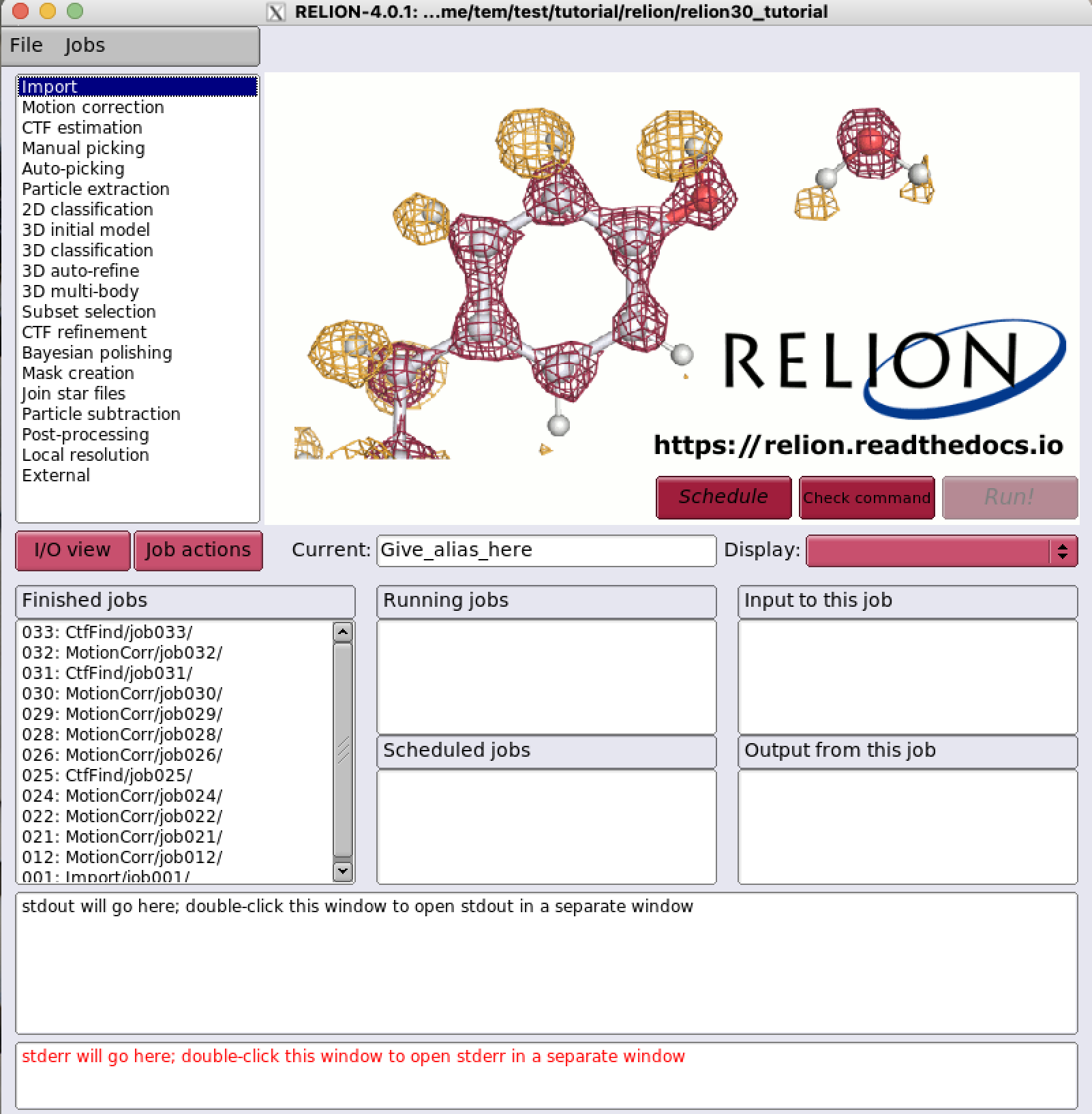
Execute the relion (we assume that X11 forwarding is enabled)
Relion job templates (Standard submission scripts)
All the relion job templates (also known as standard submission scripts) for PBSPro is located at the following directory :
/tem/al9/templates/relion
$> cd /tem/al9/templates/relion
$> tree .
.
├── relion-4.0.1-cpu.bash
├── relion-4.0.1-gpu-cuda11.bash
├── relion-4.0.1-gpu-cuda12.bash
├── relion-4.0.1-intel.bash
├── relion-5.0.0-cpu.bash
├── relion-5.0.0-gpu-cuda11.bash
├── relion-5.0.0-gpu-cuda12.bash
└── relion-5.0.0-intel.bash
Relion pre-defined strings
The job templates file contains some pre-defined strings (XXX...XXX). Each string is replaced with some values provided by users (or automatically by the program) in the relion tool when a relion job is submitted using the template.
$> cat /tem/al9/templates/relion/relion-4.0.1-gpu-cuda12.bash
#!/bin/bash

### Inherit all current environment variables
#PBS -V

### Queue name
#PBS -q XXXqueueXXX

### GPU cluster use : Specify the number of nodes (XXXextra1XXX)
### the number of processes per each node (XXXextra2XXX)
### the number of GPUs per each node (XXXextra3XXX)
### and the size of required memory per each node (GB, XXXextra4XXX)

#PBS -l select=XXXextra1XXX:ncpus=XXXextra2XXX:ngpus=XXXextra3XXX:mem=XXXextra4XXXGB:mpiprocs=XXXextra2XXX
#PBS -o XXXoutfileXXX
#PBS -e XXXerrfileXXX

#PBS -k eod

###########################################################
### Print Environment Variables
###########################################################
... <omitted>

###########################################################
# Switch to the working directory;
cd $PBS_O_WORKDIR/XXXnameXXX
touch run.out
touch run.err
cd $PBS_O_WORKDIR
###########################################################

### Run:
module load apps/relion/4.0.1/gpu/cuda-12.6
mpirun --mca btl tcp,self --mca btl_tcp_port_min_v4 32768 --mca btl_tcp_port_range_v4 32768 -n XXXmpinodesXXX --map-by node:OVERSUBSCRIBE --machinefile $PBS_NODEFILE XXXcommandXXX

echo "Done!"
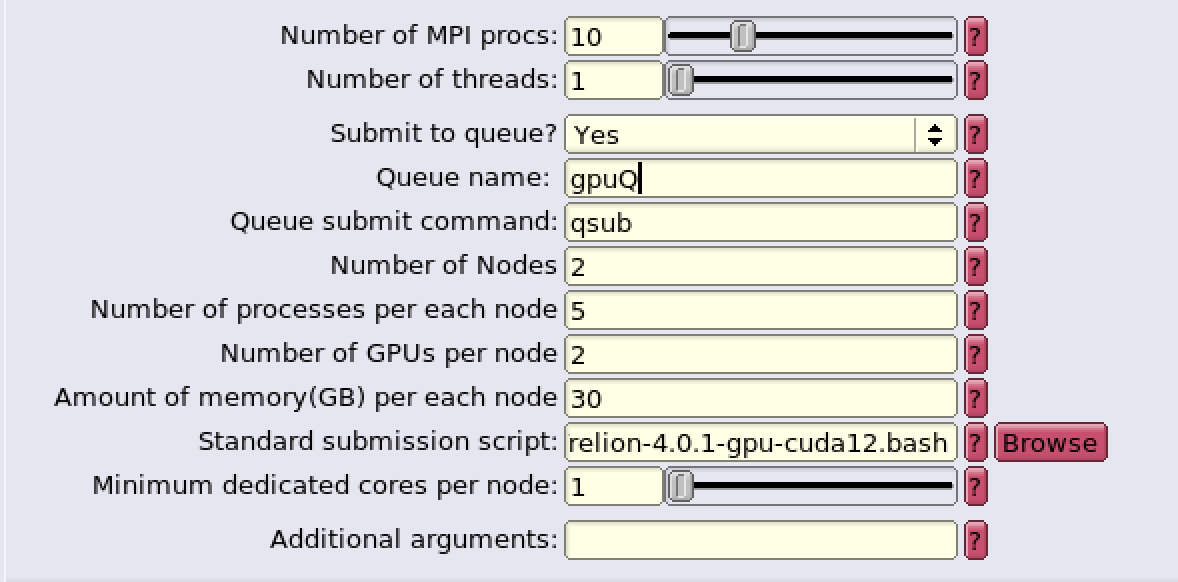
- GPU script strings
| String | Meaning | Remarks |
|---|---|---|
| XXXnameXXX | Job name | |
| XXXcommandXXX | Relion command + arguments | |
| XXXqueueXXX | Queue name (Queue name:) |
gpuQ |
| XXXextra1XXX | Number of nodes (Number of Nodes:) |
1-2 (recommended) |
| XXXextra2XXX | Number of processes per node (Number of processes per each node:) |
|
| XXXextra3XXX | Number of GPUs per node (Number of GPUs per node:) |
1-2 (recommended) |
| XXXextra4XXX | Amount of memory per node (Amount of memory(GB) per each node:) |
# of processes per node x 6GB (recommended) |
| XXXmpinodesXXX | Number of nodes x (Number of processes per node) |
- CPU scripts strings
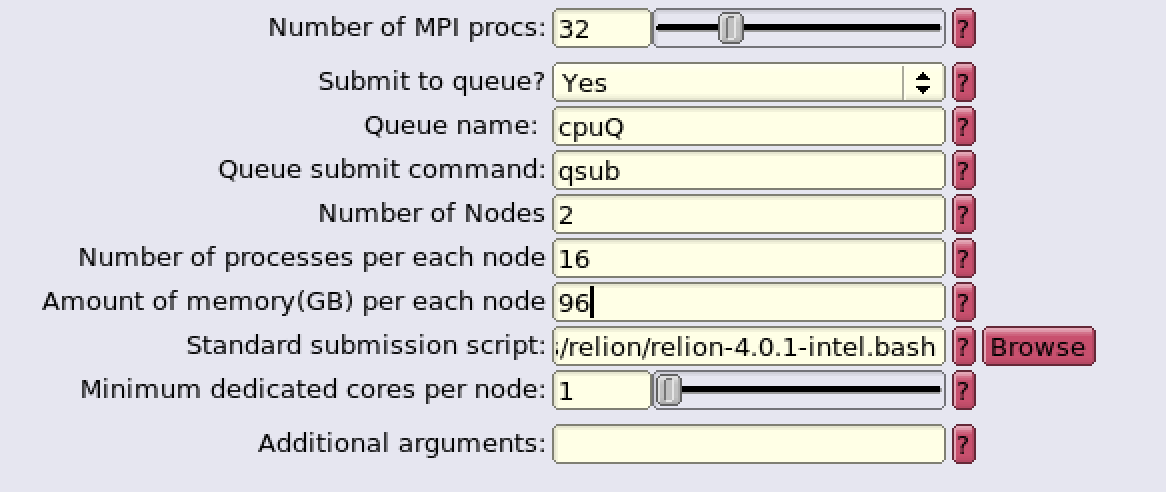
| String | Meaning | Remarks |
|---|---|---|
| XXXnameXXX | Job name | |
| XXXcommandXXX | Relion command to be executed | |
| XXXqueueXXX | Queue name (Queue name:) |
cpuQ |
| XXXextra1XXX | Number of nodes (Number of Nodes:) |
1-2 (recommended) |
| XXXextra2XXX | Number of processes per node (Number of processes per each node:) |
|
| XXXextra3XXX | Amount of memory per node (Amount of memory(GB) per each node:) |
# of processes per node x 6GB (recommended) |
| XXXmpinodesXXX | (Number of nodes) x (Number of processes per node) |